Monday, November 25, 2013

Spam Report 11/25/13


Another day, another spam report, this time courtesy of one of our wonderful Help Desk Technician's, Kate!  Thanks Kate.

This morning the Help Desk received information regarding a group of spam emails that may end up in the inboxes of PLU Students, Faculty and Staff. The email fraudulently claims that the user’s mail server storage has been exceeded and that the account will be deleted if the user does not follow the link provided. Please ignore and delete this email should you receive it. A photo of this email as well as an explanation as to how it was determined to be spam are provided at the bottom of this post for your reference.

We encourage you, as always, to err on the side of caution if you receive emails that raise your suspicions in any way. The aforementioned information at the bottom of this post may help you identify key red flags that can give away a phishing email. If you are ever uncertain as to the legitimacy of an email you receive, please do not hesitate to call the Help Desk at 253-535-7525 and we will gladly assist you in determining whether or not the message comes from a source that you can trust.


If you have responded to the email pictured below and provided any information, please take the following steps to ensure the security of your account:

  • Update your epass password at http://epass.plu.edu
  • Update your password on any sites where you used that password (i.e., if your epass was the same as your bank password, update your bank password as well)
  • Log into your Gmail and sign out of all other sessions; to do this, scroll down to the bottom of the page and look for the section which says "Last Account Activity"; click on the "Details" link; a window will appear which will let you force sign out all other sessions.
If you need assistance with any of these steps or have questions about the phishing email, please contact the Help Desk at 253-535-7525 or email us at helpdesk@plu.edu.
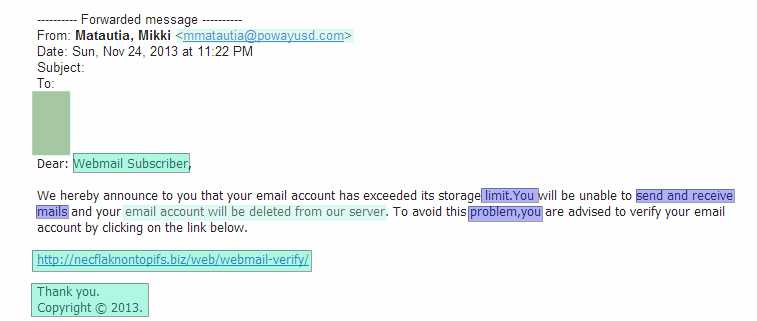

This email tips us off in a number of ways. The text highlighted in the mint color is highly suspicious because it is clear that it does not come from a PLU source. The email address that it comes from is not a PLU address and the link it is advising you to follow is not at a PLU address. Furthermore, the language and format used is not that which PLU utilizes in its communication with students, faculty and staff (“Webmail Subscriber” is not how we refer to members of the PLU community, “your email account will be deleted from our server” is not action that would be taken by PLU in this case, and there is no PLU contact information given at the end).

Simple grammatical errors such as the ones highlighted here in purple are another red flag as this number of errors should not appear in communication from PLU. Finally, the general formatting of the email is unusual, see the large empty space at the top of the email, for example, highlighted here in green.

Friday, November 15, 2013

Spam Report 11/15/13

Earlier this morning, the Help Desk received the first report of a series of spam emails being sent out to Faculty, Staff, and Students on campus regarding an update to the email system and requesting users please "update their passwords".  As can probably be guess, this is a fraudulent email, and should be promptly ignored.  At the bottom of this post is a write up of how we determined this email to be fraudulent.

As always, whenever you receive a message you think might be a phishing email, err on the side of caution and ignore it.  If you ever aren't sure, call the Help Desk at 253-535-7525, and we will be glad to help confirm or deny it.

If you responded to the email and provided any information, please do the following:
  • Update your epass password at http://epass.plu.edu
  • Update your password on any sites where you used that password (i.e., if your epass was the same as your bank password, update your bank password as well)
  • Log into your Gmail and sign out of all other sessions; to do this, scroll down to the bottom of the page and look for the section which says "Last Account Activity"; click on the "Details" link; a window will appear which will let you force sign out all other sessions.
If you need assistance with any of these steps or have questions about the phishing email, please contact the Help Desk at 253-535-7525 or email us at helpdesk@plu.edu.

A beautiful example of non-sense spam, all prettied up with color coding!
Click to enlarge.

Saturday, November 2, 2013

New Google Toolbar

Are you wondering what happened to the black tool bar across the top of of your Gmail and Calendar that allows you to open other Google Apps? Google replaced the bar with a new Apps launcher icon to the top right of the screen. Clicking on the icon opens a window of Apps you can choose from... including Calendar and Drive.

For more information visit the blog posting
"Updating the Google bar: many products, multiple devices.


Thursday, October 10, 2013

APC Surge Protector Product Recall

Information and Technology Services has received a notification about particular models of APC surge protectors (pictured below) being recalled for safety concerns. From the information we have received, these models have overheated in some instances and pose a potential fire risk.  We have already identified a few locations on campus that have been using the affected surge protectors, but we do not have documentation to track who else on campus might still be using this product.  Please check the recall site here to identify if any of the surge protectors in your areas are included in the recall.  If you find that your department has one of these surge protectors in use, please stop using it immediately and contact the Help Desk at 253-535-7525 to let us know.  We will locate a replacement for you and submit the claim through APC.  For additional information on the recall, please see the information posted by KOMO news and if you have additional questions don’t hesitate to contact the Help Desk by phone at 253-535-7525 or email at helpdesk@plu.edu.


Monday, September 9, 2013

Spam Report 9/9/2013

At approximately 2:00 pm today, the Help Desk received reports of a spam email offering money for survey taking.  A screenshot of the email text is attached to this post.

While this is different than the usual phishing emails we receive, we are posting a warning on this because it's very important to be able to identify and avoid scam emails.  Often times scammers will send out enticing emails offering vast sums of money for little to no work; in cases like these, the old adage applies:  If it sounds too good to be true, it probably is.

If you have already responded to the email, please discontinue all communication immediately.  If you have provided personal information, such as your bank account information, please contact your Bank immediately and discuss the issue, they will advise you on the proper procedure for protecting your accounts.

If you have given out any password or log in information, please follow our standard procedures for possibly compromised accounts:
  • Update your epass password at http://epass.plu.edu
  • Update your password on any sites where you used that password (i.e., if your epass was the same as your bank password, update your bank password as well)
  • Log into your Gmail and sign out of all other sessions; to do this, scroll down to the bottom of the page and look for the section which says "Last Account Activity"; click on the "Details" link; a window will appear which will let you force sign out all other sessions.
Any questions, please contact the Help Desk at 253-535-7525 or helpdesk@plu.edu.  You can also stop in at the Help Desk located on the first floor of the Library.

-D.D.

Example of too good to be true.  Click to enlarge

Thursday, August 29, 2013

Spam Report 8/29/13

At approximately 6:30 pm on August 28th, a wave of spam emails went out to many users on campus.  The Help Desk began receiving reports this morning of the email.  At the bottom of this post is a write up of how we determined this email to be fraudulent.

As always, whenever you receive a message you think might be a phishing email, err on the side of caution and ignore it.  If you ever aren't sure, call the Help Desk at 253-535-7525, and we will be glad to help confirm or deny it.

If you responded to the email and provided any information, please do the following:
  • Update your epass password at http://epass.plu.edu
  • Update your password on any sites where you used that password (i.e., if your epass was the same as your bank password, update your bank password as well)
  • Log into your Gmail and sign out of all other sessions; to do this, scroll down to the bottom of the page and look for the section which says "Last Account Activity"; click on the "Details" link; a window will appear which will let you force sign out all other sessions.
If you need assistance with any of these steps or have questions about the phishing email, please contact the Help Desk at 253-535-7525 or email us at helpdesk@plu.edu.


Our analysis of the email (Click to Enlarge)
 

Wednesday, June 5, 2013

Gmail Inbox to be updated; Mailbox tabs and graphics update

Recently posted on the Official Google Blog, Google is planning on rolling out an update for Gmail's inbox which changes the overall look of the inbox.  This is largely an aesthetic update, but the default is a bit different from the interface we all know and use daily.  The video below gives us a brief tour of the new inbox.


↵ Use original player
By Google
← Replay
X
i
As of right now details are a bit sparse as to how email is filtered into the tabs or how much control users have over tabs; we will update users as more information arrives.

If you do not like the idea of multiple tabs in your email, you can always switch it back to classic mode.

This update should be rolling out over the next few weeks, though a specific time has not been stated.

Original Link